
10 Hidden Backtracking Patterns Every DSA Beginner Should Know
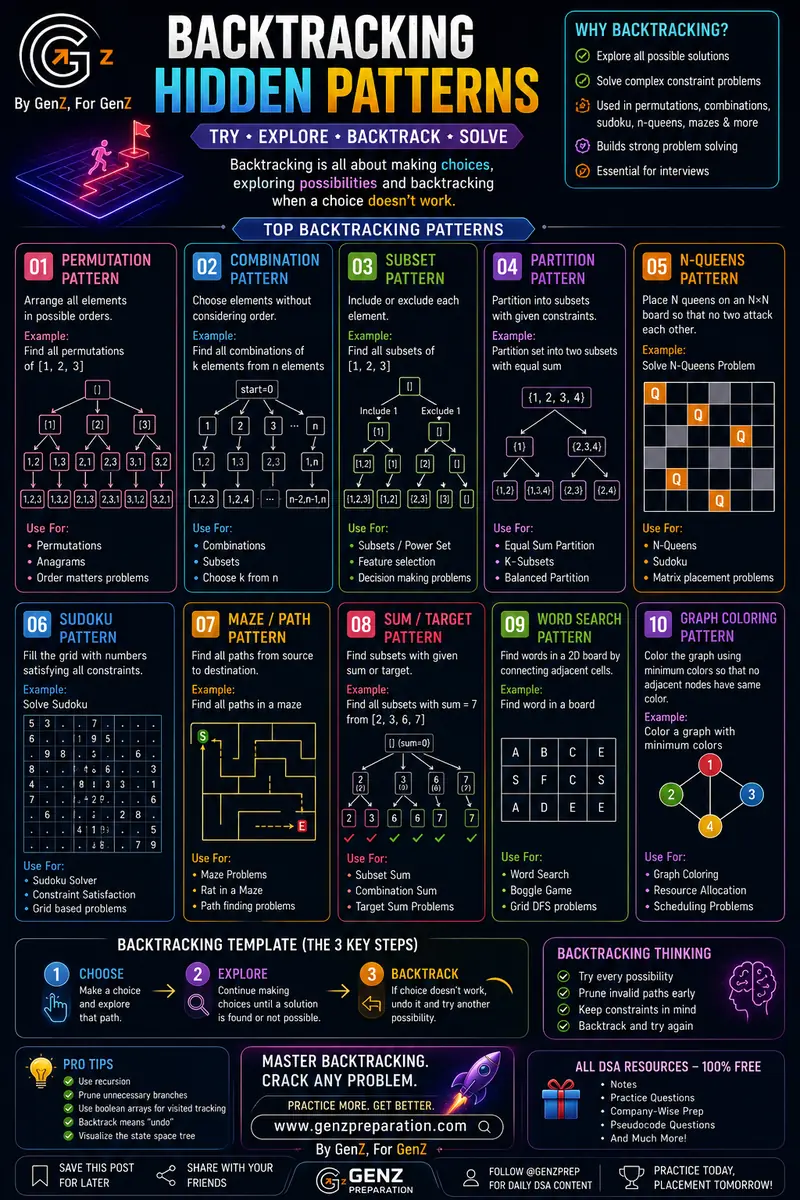
Backtracking scares a lot of people when they first see it — the recursion trees look messy, and it's easy to feel lost in all the branching. But once you realize almost every backtracking problem is built from the same handful of patterns, it suddenly gets a lot easier. This guide breaks down 10 patterns you'll see again and again, in plain, simple language.
What is Backtracking, Really?
Backtracking is just trying things, and undoing them if they don't work.
Think of it like walking through a maze:
- You choose a path and walk into it.
- You explore — keep walking until you hit a dead end or reach the goal.
- If it's a dead end, you backtrack — walk back and try a different path instead.
That's it. That's the whole idea. Every pattern below is just this same loop, applied to a different kind of problem.
Why Learn Backtracking?
- It helps you explore all possible solutions to a problem, not just one.
- It's how you solve constraint-based problems — puzzles where some choices are allowed and others aren't.
- It shows up constantly in interviews — permutations, combinations, Sudoku, N-Queens, and maze problems are all backtracking classics.
- It builds strong problem-solving instincts that carry over to other topics like recursion and dynamic programming.
The 10 Backtracking Patterns
1. Permutation Pattern
What it does: Arranges all elements in every possible order.
Example: Find all permutations of [1, 2, 3] → [1,2,3], [1,3,2], [2,1,3], [2,3,1], [3,1,2], [3,2,1].
How to think about it: At each step, pick one number you haven't used yet, place it, and recurse. When you run out of numbers, you've got one full arrangement — record it and backtrack to try a different order.
Used for: Permutations, anagrams, and any problem where the order of elements matters.
2. Combination Pattern
What it does: Chooses elements without caring about order.
Example: Find all combinations of k elements from n elements — e.g., choosing 2 numbers out of [1, 2, 3].
How to think about it: Similar to permutation, but instead of trying every number at every step, you only move forward from where you left off — so [1,2] and [2,1] aren't counted as different combinations.
Used for: Combinations, subset generation, "choose k from n" style problems.
3. Subset Pattern
What it does: For every element, decide whether to include it or exclude it.
Example: Find all subsets of [1, 2, 3] — this includes the empty set [] and the full set [1,2,3] too.
How to think about it: At each element, you branch into two paths — one where you include it, one where you don't. By the time you've gone through every element, you'll have generated every possible subset (this is also called the "power set").
Used for: Subsets/power set problems, feature selection, and any yes/no decision-making problem.
4. Partition Pattern
What it does: Splits a set into smaller groups that satisfy a given condition.
Example: Partition {1, 2, 3, 4} into two subsets with equal sum.
How to think about it: It's a mix of the subset pattern with an extra constraint check — at each step you're still deciding "include or exclude," but you only keep branches where the final groups actually satisfy the condition (like equal sums).
Used for: Equal-sum partition, k-subset problems, balanced partition problems.
5. N-Queens Pattern
What it does: Places N queens on an N×N chessboard so that no two queens attack each other.
Example: Solve the classic N-Queens problem.
How to think about it: Go row by row, and in each row, try placing a queen in every column. Before placing, check if it's "safe" (no other queen shares its row, column, or diagonal). If it's safe, place it and move to the next row. If a row has no safe spot, backtrack to the previous row and try a different column.
Used for: N-Queens, Sudoku-style placement problems, matrix placement problems.
6. Sudoku Pattern
What it does: Fills a grid with numbers so every row, column, and box satisfies the Sudoku rules.
Example: Solve a Sudoku puzzle.
How to think about it: Find the next empty cell, try numbers 1 through 9 in it, and check if the number is valid for that row, column, and 3×3 box. If valid, move to the next empty cell. If no number works, backtrack and try a different number in the previous cell.
Used for: Sudoku solvers, and any constraint-satisfaction, grid-based problem.
7. Maze / Path Pattern
What it does: Finds all possible paths from a source to a destination.
Example: Find all paths through a maze from start (S) to end (E).
How to think about it: From your current cell, try moving in every allowed direction (up, down, left, right). If the move is valid (not a wall, not already visited), take it and keep going. If you get stuck, backtrack to the last cell and try a different direction.
Used for: Maze problems, "Rat in a Maze," and general pathfinding problems.
8. Sum / Target Pattern
What it does: Finds subsets of numbers that add up to a specific target.
Example: Find all subsets of [2, 3, 6, 7] that sum to 7.
How to think about it: Same include/exclude idea as the subset pattern, but this time you keep a running sum. If the sum matches the target, record it. If the sum goes over the target, stop that branch early — no point exploring further (this is called "pruning," and it's what makes backtracking fast).
Used for: Subset sum, combination sum, target sum problems.
9. Word Search Pattern
What it does: Finds a word hidden inside a 2D grid of letters by connecting adjacent cells.
Example: Search for a word in a letter grid, moving between neighboring cells only.
How to think about it: Start from a cell that matches the word's first letter, then check its neighbors for the next letter, and so on. Mark cells as visited so you don't reuse them, and un-mark them (backtrack) if that path doesn't lead to the full word.
Used for: Word Search, Boggle-style games, and grid-based DFS problems.
10. Graph Coloring Pattern
What it does: Colors every node in a graph using the fewest colors possible, so that no two connected nodes share the same color.
Example: Color a graph using the minimum number of colors.
How to think about it: Pick a node, try coloring it with the first available color that none of its neighbors are using. Move to the next node and repeat. If a node can't be colored without a conflict, backtrack and try a different color for an earlier node.
Used for: Graph coloring, resource allocation, and scheduling problems.
The Backtracking Template — 3 Key Steps
No matter which pattern you're solving, you'll almost always follow the same three steps:
- Choose — Make a choice and move forward with it.
- Explore — Keep making choices (recurse) until you reach a full solution or hit a dead end.
- Backtrack — If the current path doesn't work, undo the last choice and try a different one.
How to Think in Backtracking
- Try every possibility — backtracking is about being thorough, not clever shortcuts.
- Prune invalid paths early — the moment you know a path can't work, stop exploring it. This saves a huge amount of time.
- Keep constraints in mind — always check the problem's rules before making a choice, not after.
- Backtrack and try again — undoing a choice isn't a failure, it's just part of the process.
Pro Tips
- Use recursion — backtracking is almost always implemented recursively; get comfortable with recursive thinking first.
- Prune unnecessary branches — check constraints as early as possible instead of waiting until the end.
- Use boolean arrays for visited tracking — especially useful in maze, word search, and graph problems.
- Remember: backtrack means "undo" — after exploring a choice, always undo it before trying the next one.
- Visualize the state space tree — drawing out the recursion tree (like the diagrams above) makes the pattern click a lot faster than just reading code.
Final Thoughts
Backtracking isn't really "one" topic — it's the same choose-explore-backtrack loop applied to ten different flavors of problems. Once you can spot which pattern a problem belongs to, writing the solution becomes a lot more mechanical and a lot less intimidating.
Want to put this into practice? Head over to our free DSA practice section for company-wise questions, notes, and pseudocode explanations.
Ready to practice?
Try our free placement practice tests or check current job openings.